We're excited to share these Frequently Asked Questions (FAQs) with you. Our goal is to provide clear and helpful answers to the most common questions we've received about V5.
Last updated on: June 11, 2026
How this page works
- We have grouped the FAQs by category which can be accessed by selecting a button.
- When selected, the questions for the category will be displayed.
- To view an answer, click on a question or select the + next to the question.
- The section will be closed by clicking on another question or by selecting the x next to the question.
If you don't find the information you're looking for, feel free to reach out and ask us directly. We're here to help!
Upgrading to V5
When will we be able to upgrade to V5?
While we had anticipated that upgrades to V5 would begin in mid-2026, we have had to adjust our timeline as we need more time to complete essential elements like backwards compatibility features and the migration tools.
Given the scope of work, we are aiming to begin upgrades early 2027. We’ll provide more updates as development progresses.
As we expect that it will take about three years to upgrade all existing V4 sites, you can plan to continue using your current site throughout 2027 and 2028.
When will our site upgrade be scheduled?
When we are ready to start scheduling upgrades, we will reach out to your Primary ShareVision Administrator with next steps and all necessary details. We will not schedule your upgrade without first communicating with them.
Will the upgrade process be as taxing as upgrading from V3x to V4?
No, upgrading to V5 will be much easier. V5 maintains a similar interface to V4, making it a more familiar experience for users transitioning from the current version. We’ve also taken into account feedback from our previous migration and are implementing improvements to address any past issues, ensuring a smoother and more user-friendly upgrade process.
Will this be automatic?
Yes, anything that can be brought over via the migration utility will be handled automatically. This includes portals, pages, page part settings, and security configurations. We’re also developing tools to help import your forms’ structure and data, and it’s likely that individual-based permissions, case worker settings, service permissions, and wizard rules will transfer automatically as well.
Will our reports migrate over automatically?
All stock reports that came with V4 will be rebuilt and available in V5. However, custom reports are not included in the automatic migration and will need to be recreated using the new report designer tool in V5. You have the flexibility to create these reports yourself, hire a third party, or work with our team to rebuild them, as you did previously.
Can we upgrade the database to SQL but keep the front-end V4 since we just learned how to use this portal configuration tool?
The front end in V5 retains much of the same usability as V4, with enhancements that make it even more intuitive. It uses the same configuration tools, so you should find it just as easy to manage. In essence, upgrading to V5 allows you to keep the familiar V4 experience, but with an updated look, improved features, and extra functionality.
Will the upgrade to V5 force a new front-end template?
Will there be things we have to remove because we don’t want to use them even though they are part of the standard layout/design?
In V5, we’ve removed the extra sample data, providing a leaner setup with just one test service, one test client, and the essential system elements. This reduces the need to delete any pre-loaded content. Additionally, your existing portals, pages, and page parts will carry over with the same layout as in V4, which is why we required all V3x customers to upgrade to V4 first to ensure a smoother migration experience.
Will we have a batch tool to archive and delete individuals?
V5 has a delete client (aka individual) feature allowing you to delete one client (individual) at a time. While we don't yet have an archive client feature yet, it is on our roadmap for future development.
Will we have a batch tool to archive and delete staff without losing history since we will pay for the number of users?
In V5, you can deactivate a user and they will no longer be counted towards your user limit so there is no need for archiving. We will look at whether an archive tool for users (staff/employees) may be something we add in future to help keep your site tidy.
When will we be forced to upgrade to V5?
We have not yet set an end-of-life date for V4. We plan to announce it when we’re ready to start upgrading customers who wish to move to V5 first. This will give everyone ample time to prepare and transition at their own pace.
Given the number of sites to be upgraded, we anticipate supporting V4 until at least 2028.
Will there be any differences for customers based on SharePoint versions that they are upgrading from?
No, the process and dates should be the same for all existing V4 customers.
Can everything I have in V4 configuration be brought over to V5?
The V5 configuration is based on the V4 format so all portal, page, and page part configurations (including security settings) will come over intact. As we are no longer using SharePoint, some of the site security may not come over though we are working hard to try and map this in our migration utility. The V5 security setup using user roles is much simpler without the confines of SharePoint.
Will there be an end of life for V4? If so, when?
Yes, we will eventually announce an end-of-life date for V4. However, this date has not been determined yet. As with previous versions, we will communicate the end-of-life timeline well in advance to give you ample time to prepare for the transition.
You will still be able to renew your V4 subscription until the end-of-life date.
Pricing
How much does V5 cost?
V5 subscriptions require an annual commitment and are priced based on your maximum number of active users, rather than per-user fees. You can choose between two editions—Simply or Plenty—and pay conveniently through 12 monthly credit card payments, automatically billed via Stripe on your site.
Simply - includes 10 GB of storage *
- Simply 10 - maximum of 10 active users
- Simply 25 - maximum of 25 active users
- Simply 50 - maximum of 50 active users
Plenty - includes 100 GB of storage *
- Plenty 100 - maximum of 100 active users
- Plenty 250 - maximum of 250 active users
- Plenty 500 - maximum of 500 active users
Current pricing and features for each subscription are available on our website: Pricing.
Note: The new subscription pricing and model will only come into effect when you upgrade to V5.
* To learn more about storage, please review: Are there fees for additional storage? (below)
Additional User Packages Add-on
If you need to increase the number of active users on your site, you may have considered upgrading to the next subscription edition. If upgrading to the next level would result in significantly more active user accounts then what your organization requires, you may be able to subscribe to User Packages for a monthly fee with an annual commitment. For most subscriptions, these packages provide additional active users on your site without having to upgrade your subscription.
Please review our Additional User Packages Add-on knowledge base article to learn more.

How do we pay for V5 subscriptions?
All subscriptions require monthly credit card payments through your site. Each subscription is for a full year, with 12 monthly payments automatically billed via Stripe. Paying monthly makes budgeting easier, helps spread costs evenly over the year, and ensures uninterrupted access to your ShareVision site. You can easily view your Stripe account details, including invoices, directly on your ShareVision site.
Are there fees for additional storage?
We’re excited to share that new and improved storage options are available in V5! Uploaded documents and images are no longer stored in the database like they are in V4. As such, the storage included in your subscription is separate from the database size of your ShareVision site. These enhancements make it easy to connect and use external storage providers like OneDrive and Google Drive seamlessly with your site.
With this change, you can set up all of your storage outside of your site’s built-in storage, giving you more flexibility and space. When you upgrade to V5, you will be able to use OneDrive and/or Google Drive for:
- Client Documents (in V4: Individual’s Documents)
- Service Documents (in V4: Program and Residence Documents)
- Other Documents and Images (in V4: Document and Picture Libraries)
- Document Uploader on Forms (in V4: List Attachments)
If you choose to use the Document Storage available on your V5 site instead of OneDrive or Google Drive, additional space beyond the storage included with your subscription can be purchased for a monthly fee.
For Simply subscriptions:
- 10 GB of storage is included
- Data Packs (10 GB per pack) can be purchased for a monthly fee of $2.50 (plus applicable taxes)
For Plenty subscriptions:
- 100 GB of storage is included
- Data Packs (100 GB per pack) can be purchased for a monthly fee of $25.00 (plus applicable taxes)
Are inactive users included in the total number of users for the user tier pricing?
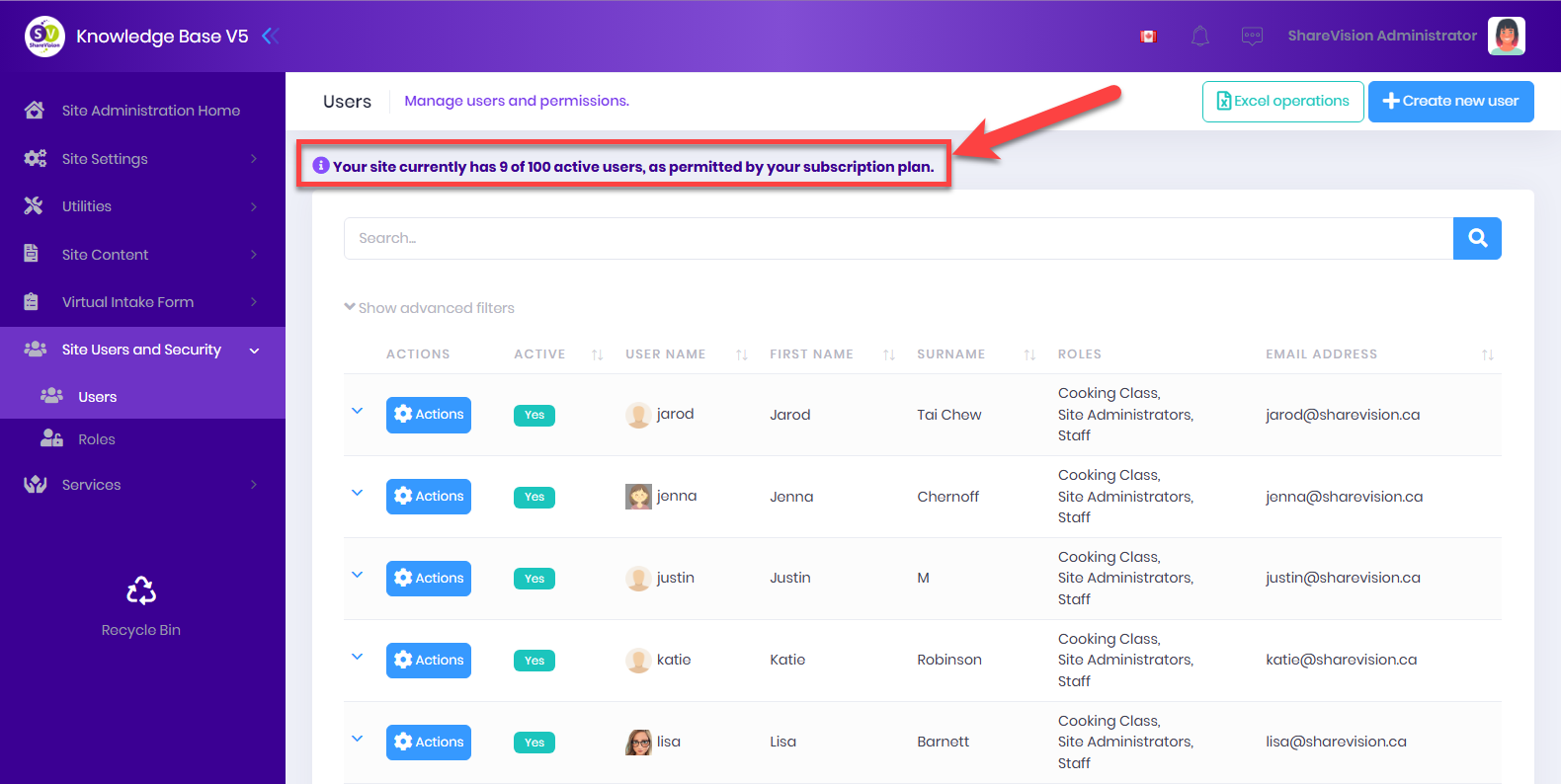
No. Only active users are counted. If you subscribe to Plenty 100 and have 83 active users and 28 inactive users, your will not need to upgrade your subscription to Plenty 250 even though the total users (active and inactive) is greater than 100.
On the Users page in Site Administration, the total active users are displayed at the top of the user list:

Will we have a batch tool to archive and delete staff without losing history since we will pay for the number of users?
In V5, you can deactivate a user and they will no longer be counted towards your user limit so there is no need for archiving. We will look at whether an archive tool for users (staff/employees) may be something we add in future to help keep your site tidy.
What is the cost for custom work in V5?
Help from Product Experts and any other billable services will be handled via a credit system in V5. Requests will be made through the in-app services page. All estimates will be provided in credits and each credit will cost $50 plus applicable taxes. Estimates will be based on a formula that factors in task complexity, which ShareVision teams will be assigned, effort to complete the task as well as a number of other inputs.
V5 Product Info
When can we see V5?
We are happy to share this V5 Quick Tour video with you.
Will V5 be faster than V4?
V5 has been built from the ground up to be as fast as possible while still being heavily data centric. We are using completely different (and much more modern) technology which gives us a number of new opportunities to scale up and out more quickly if we do hit slow downs in the future. We will also be providing optional paid add-on features that will allow organizations to be hosted in more isolated environments where they will be less affected by other site’s usage. All of this should make V5 the fastest version of ShareVision yet.
Is V5 cloud based?
Yes, it is hosted on Microsoft Azure.
Will users find V5 challenging?
How different is V5 compared to V4?
V4 users will find moving to V5 easy because we kept the layout and how things work the same. In V5, the quick start menu, portals, pages and page parts work exactly the same as in V4. We have also made it easier to add new clients and add or exit clients from services.
How hard will it be for Site Administrators to learn V5?
By consolidating many features in Site Administration, Site Administrators will be able to set up their sites in less time. Adding or editing forms and configuring your portals is faster and easier than in V4!
Will email notifications be available?
Are there any changes to notifications?
In V5, we are replacing the Email Alert Manager with the Notification Manager. Notifications can be set up to send alerts:
- via email
- as an in-app notification
- a text message (SMS*)
Your Site Administrator can easily configure each notification to use one or more of theses alert methods.
* For text message (SMS) notifications, a Twilio account is required and standard message & data rates may apply.
Will V5 be built on SharePoint?
V5 will be built on SQL Server and will be hosted on Microsoft Azure.
Are there any changes to how Calendars and Documents work in V5?
In V5, calendars in ShareVision will need to be connected to a Google or Microsoft account. Once connected, the calendars in that account can be exposed using the Calendar Page Parts on your ShareVision site.
For Documents, while V5 still comes with built-in document storage where documents can be uploaded into your ShareVision database, Google Drive and Microsoft Accounts are now fully supported providing a seamless user experience.
Does V5 work on mobile devices?
Yes.
Will Two Factor Authentication (2FA) and/or Multi Factor Authentication (MFA) be available in V5?
Yes.
Will Single Sign On (SSO) be available in V5?
Yes, we support signing on with Google or Microsoft accounts for customers with Plenty subscriptions.
Will V5 allow the customer to set up their own password policies?
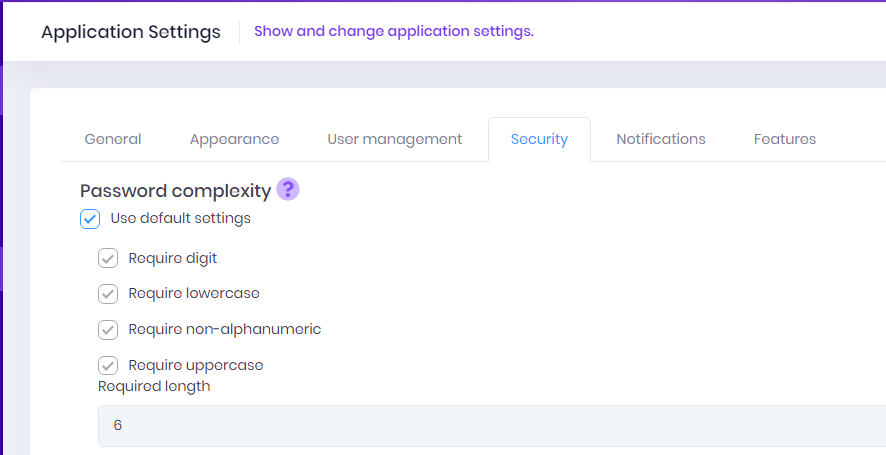
We support customer’s own password policies. ShareVision Site Administrators can set whether digits, lowercase, non-alphanumeric and/or uppercase characters are required. They can also set the required password length.

Will V5 allow the customer to enable or disable user lock out? If so, can they set the lock out duration?
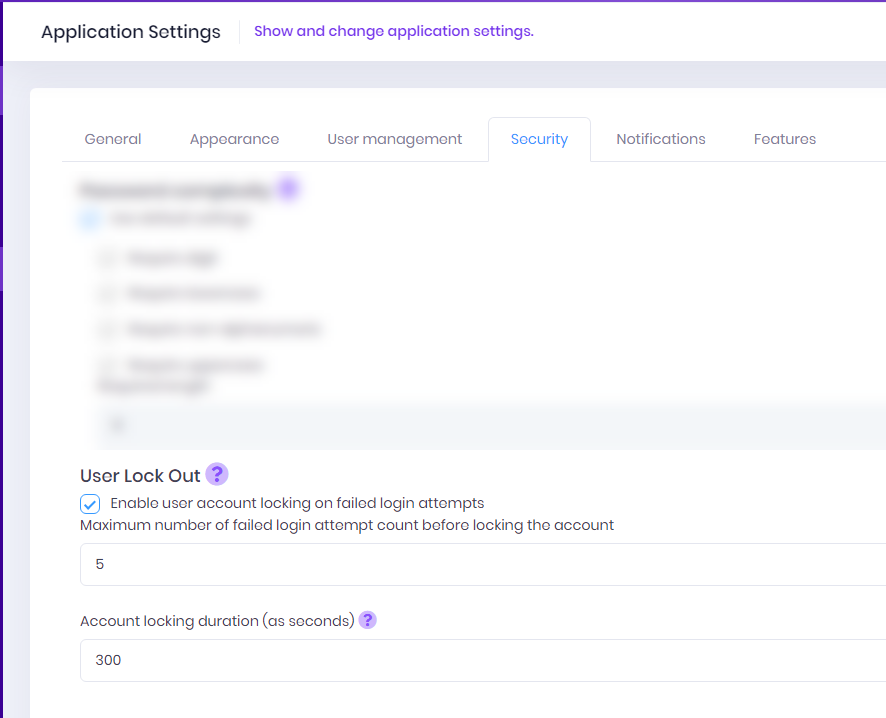
Yes, in V5, ShareVision Site Administrators can set both the number of login attempts before a user’s account is locked and how many seconds a user account is idle before the system automatically logs them out.

How does reporting work in V5?
Reporting has been completely overhauled in V5. The reporting tool we had used in V4 was getting pretty outdated so we moved to a new, integrated reporting engine.
All stock reports that came with V4 will be rebuilt and available in V5. However, custom reports are not included in the automatic migration and will need to be recreated using the new report designer tool in V5. You have the flexibility to create these reports yourself, hire a third party, or work with our team to rebuild them, as you did previously.
Customizations
Will customization be available in V5?
In V5, we are introducing a more flexible approach to configuration by building greater configurability directly into the base product. Our team continues to review the most commonly requested and widely used customizations from V4, with the goal of replacing custom development with built-in V5 features.
One example currently in development is the new Double Stacker feature. This enhancement will allow Site Administrators to link two lists so that when a user selects an item in the top list page part, the related items automatically display in the bottom list page part on the same page. If you’ve used Goals and Progress, you’re already familiar with how a double stacker works.
Will customizations be moved automatically?
We’re still developing the migration utility and hope to move at least some customizations automatically, especially simpler ones. Additionally, some customizations from past versions have been incorporated into the base product in V5, so they may not need to be migrated. While we can’t guarantee all customizations will transfer seamlessly, the similar blueprint of V5 should help make the process easier, even if some elements require manual adjustments. We’re committed to making the transition as smooth as possible and will focus on carrying over as much as we can.
Will we have to pay for each customization a third time (V3x-V4-V5)?
As with the move from V3x to V4, many customizations may no longer be necessary in V5, as we’ve built more configurability into the base product. However, some complex customizations that aren’t covered in the standard features might still require billable work if you wish to retain them. We’ll aim to incorporate as much as possible, but certain unique elements may need to be recreated in V5.
What is the cost for custom work in V5?
Help from Product Experts and any other billable services will be handled via a credit system in V5. Requests will be made through the in-app services page. All estimates will be provided in credits and each credit will cost $50 plus applicable taxes. Estimates will be based on a formula that factors in task complexity, which ShareVision teams will be assigned, effort to complete the task as well as a number of other inputs.
V4 Feature Transfer
Will V4 custom add-ons be supported for V5?
V5 already has new features built in that do what many existing add-ons do but with a much easier to use interface while supporting the same (or very similar) functionality.
The Form Extensions feature on V4 sites has been improved and is already included in the V5 base functionality. Additional features in V5 include:
- Delete Individuals Tool
- Merge Clients Tool
Will our reports migrate over automatically?
All stock reports that came with V4 will be rebuilt and available in V5. However, custom reports are not included in the automatic migration and will need to be recreated using the new report designer tool in V5. You have the flexibility to create these reports yourself, hire a third party, or work with our team to rebuild them, as you did previously.
How will attendance and staff communication log already in SQL server be supported?
A new and improved attendance feature is currently in development for V5. While the Comm Log was not originally planned for V5, it will be developed thanks to valuable customer feedback.
Because the structures of both of these features will differ from V4 as we take we can take full advantage of new capabilities in V5, data imported from V4 will be archived on your V5 rather than being directly integrated into the new system.
If you need access to this archived information, you can build reports can using the Report Designer on your V5 site or you can have reports built for you on your site through our services, utilizing credits.
What current add-on feature(s) won’t be available in V5?
The Config Data Copy custom feature is not on the roadmap for V5.
We are evaluating others and will make that information available as soon as a final decision is made.